
October 26, 2026 10 min read
Faster than the page cache: TYPO3 with StaticFileCache
My site is now delivered as static files straight from Apache, without PHP and without a database. What it brings, which pitfalls I ran into and why I deliberately decided against a CDN.
To be honest: for a private site with moderate traffic, this is overkill. Thanks to its page cache, TYPO3 already serves my pages quickly. But because I wanted to write about it, because I know how it's done, and because the answer to “why are you doing this?” may always be “because I can”, I got started.
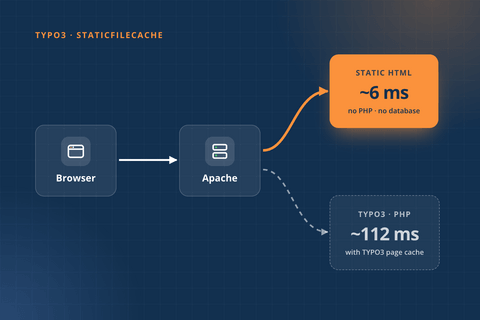
The idea behind EXT:staticfilecache is simple: every fully rendered page is additionally stored as a static HTML file. On the next request, Apache delivers that file directly. PHP and the database never even notice.
How StaticFileCache works
On the first request, TYPO3 renders the page as usual. If it can be cached statically, the extension writes it gzip-compressed to typo3temp/assets/tx_staticfilecache/, together with a small .htaccess carrying the matching headers such as Content-Type and Content Security Policy. From then on a rewrite rule takes over: if there is a file for the requested URL, Apache delivers it.
Only what is identical for all visitors is cached statically:
- GET requests without a query string,
- no logged-in frontend or backend users,
- no uncached content such as
USER_INTorCOA_INTon the page.
My site is a good fit: no search, no login, nothing personalised. The only exception are the comments below the blog articles, more on that further down. Installing it is quick:
composer require lochmueller/staticfilecache
vendor/bin/typo3 extension:setup
On top of that come the rewrite rules in the .htaccess, shortened to the essentials here. The full template is in the extension's documentation:
# Path of the cached file (gzip variant)
RewriteRule .* - [E=SFC_FULLPATH:typo3temp/assets/tx_staticfilecache/%{ENV:SFC_PROTOCOL}_%{ENV:SFC_HOST}_%{ENV:SFC_PORT}%{ENV:SFC_URI}/index.gz]

# Deliver the static file: GET without query string, existing file, nobody logged in
RewriteCond %{QUERY_STRING} ^$
RewriteCond %{ENV:SFC_ROOT}/%{ENV:SFC_FULLPATH} -f
RewriteCond %{HTTP_COOKIE} !staticfilecache [NC]
RewriteCond %{REQUEST_METHOD} GET
RewriteRule .* %{ENV:SFC_ROOT}/%{ENV:SFC_FULLPATH} [L]
The debug header X-SFC-State tells whether everything works: TYPO3 - add to cache turns into StaticFileCache - via htaccess on the second request.
Pitfall: Content Security Policy with nonces
Things got interesting with the Content Security Policy. By default TYPO3 uses nonces in the frontend: every response gets a new random value, and only scripts carrying that value may run. With the regular page cache this works because TYPO3 swaps the nonce on every delivery. A static file can't do that, the nonce would be frozen and identical for every visitor.
StaticFileCache offers the option cspGenerationOverride, which does exactly that. A fixed, publicly known nonce doesn't protect anything anymore, though. So I went the other way: a CSP without any nonces. That works because all scripts are files from my own server anyway and are protected by Subresource Integrity. All it takes is a csp.yaml in the site configuration:
# config/sites/<site>/csp.yaml
enforce:
  inheritDefault: true
  reportingUrl: false
  mutations:
    - mode: reduce
      directive: 'script-src'
      sources:
        - "'strict-dynamic'"
        - "'nonce-proxy'"
Three more adjustments were needed:
- No nonce attributes on files: So far every asset got a nonce. As long as a nonce is in the HTML, TYPO3 marks the page as not statically cacheable. This can now be switched off per site.
- Matomo as a file: The tracking code used to be an inline script. It is now a JavaScript file configured via
dataattributes, cookieless as before. - No reporting endpoint: The default report URL contains a per-request hash, which would be frozen into a static file as well.
<script src="/_assets/.../matomo-tracking.js"
        data-matomo-url="matomo.example.org"
        data-matomo-site-id="3"
        data-matomo-cookieless="1"
        integrity="sha256-..." type="module" defer></script>
In the end the policy is even tidier than before.
Pitfall: comments
On the blog articles, however, the static cache still didn't kick in. The culprit was the comment feature, for which I use EXT:pw_comments. The extension registers the comment list and the form as completely uncached plugins, and the comment count in the heading is a COA_INT. On top of that: as soon as a page has even a single uncached element, TYPO3 switches the nonce substitution back on, no matter how the CSP is configured. So one uncached element immediately drags in the next reason.
Yet nothing about the comment list is personalised, and the empty form looks the same for everyone. Only the actions that store something have to be uncached: submitting a comment and approving it. So I registered the plugins again in my own extension:
ExtensionUtility::configurePlugin(
    'PwComments',
    'new',
    [CommentController::class => 'new,create,confirmComment'],
    // Only actions that write stay uncached
    [CommentController::class => 'create,confirmComment']
);
That wasn't the end of it, though:
- cHash for the form and links: pw_comments excludes its parameters from the cHash calculation. With a cached plugin, TYPO3 would simply have answered the submitted form with the cached page, and the comment would never have been stored. With a cHash, every action gets its own cache variant, which Extbase renders uncached. StaticFileCache leaves these URLs alone anyway because of the query string.
- Nothing personal in the cache: The form pre-filled name and email address from the session and showed the thank-you note as a flash message. In a cached page, things like that quickly end up with every visitor. Both are gone. The notice after submitting is now part of the HTML and is shown via CSS
:targetas soon as the redirect points to its anchor. - CSS without a nonce: Anything included via
page.includeCSSalways gets a nonce in TYPO3, and that can't be switched off. So I include the extension's stylesheet via the AssetCollector instead, with Subresource Integrity and only on pages with comments.
I don't have to take care of refreshing: when Extbase stores a comment, it clears the cache of the affected page by itself. After approval, the comment is visible right away, and from the next request on the page is a static file again.
Staying current: invalidation via cache tags
The static files are tied to the tag system of the TYPO3 page cache. When I save content in the backend, exactly the affected page disappears from the static cache, everything else stays where it is. The next visitor gets the page freshly rendered by TYPO3, everyone after that gets the file again.
StaticFileCache also has a boost mode: changed pages are not deleted but regenerated in the background. Visitors never hit an empty cache, but only see changes after the next scheduler run. I did without it for my site. Here, a change being visible immediately matters more to me than the few milliseconds for the first visitor.
Deployment: fresh cache, warm again right away
Every deployment lands in a new release directory and therefore starts with an empty static cache. That's intentional: thanks to Subresource Integrity, the hashes of the CSS and JavaScript files are part of the HTML. The browser would block an old static page combined with new assets.
So that the first visitor after a deployment doesn't have to wait, a small script at the end of the deployment requests every URL from the XML sitemaps once:
extract_locations() {
grep -o '<loc>[^<]*</loc>' | sed -e 's/<[^>]*>//g' -e 's/&/\&/g'
}
for BASE_URL in "$@"; do
curl -fsS "${BASE_URL%/}/sitemap.xml" | extract_locations | while read -r SITEMAP_URL; do
curl -fsS "${SITEMAP_URL}" | extract_locations
done
done | sort -u | xargs -P 4 -I{} curl -s -o /dev/null --compressed -w '%{http_code} {}\n' {}This way, just under 70 pages in both languages are static again after about ten seconds.
By the way, this can also be set up so that the static cache survives deployments; that way you could even update TYPO3 in the background without anyone noticing in the frontend. Combined with the extension CacheFlow, published by F7, this can be a good solution: the site stays just as fast during and after a deployment and refreshes itself step by step.
Keeping content up to date
Some pages, however, should update themselves, the start page for example. It shows upcoming events where you can meet me, and it lists new blog articles.
There are basically two ways to handle this:
Invalidating the page cache with built-in tools
I could configure TYPO3 to invalidate the page cache whenever I add a new page or change something relevant (teaser text, teaser image) on another page. That is easy to do with TYPO3's built-in tools, but it means the page cache of the start page (of all pages!) may be invalidated quite often.
The events are hidden automatically once they are over, and another one may move up. For that to work, the cache has to be invalidated somehow. You could, for example, clear the cache automatically at midnight or build a scheduler task that checks whether it's necessary.
And again: for a site with moderate traffic, that's fine. But it also feels a bit like taking a hammer to the cache you carefully built up.
Renewing the page cache automatically
At F7, I developed the extension CacheFlow as part of a client project, and it solves this problem a little differently. The extension is published in the TER and on Packagist, so anyone who likes the approach can easily integrate it into their own project.
The idea: CacheFlow runs as a scheduler task every few minutes, picks the pages that haven't been invalidated for the longest time, invalidates their cache and rebuilds it right away. Since the latest version, and in combination with StaticFileCache, the cache doesn't even have to be deleted: it is rebuilt first and then swapped in within milliseconds. The page doesn't just seem to be cached, it always is, and it is delivered super fast. And thanks to the automatic renewal, it is up to date after a few minutes at the latest.
Measurements
I measured locally in the DDEV container, with single requests for the response time and with ApacheBench for the throughput: 1,000 requests, ten in parallel, always the same article. The absolute numbers look different on the live server, but the ratio is meaningful:
| Delivery | Response time (median) | Requests per second |
|---|---|---|
| No cache, TYPO3 renders the page | approx. 700 ms | – |
| TYPO3 page cache via PHP | 112 ms | 54 |
| Static file via Apache | 6 ms | 1,033 |
That's roughly a factor of 20, compared to the already fast page cache. Interesting side note: even when the static file is delivered through the extension's PHP middleware, it still manages 129 requests per second. So the big leap comes from PHP not starting at all.
For visitors this mainly means: the page is there before you even think about loading times. And the server stays relaxed even during a rush.
And why no CDN?
The obvious next step would have been a CDN. I played through two variants:
- CDN in front of TYPO3: the CDN fetches the pages from the server and keeps copies at locations all over the world. Easy to set up, but the CDN still depends on the server.
- Fully decoupled: TYPO3 pushes the rendered files into a storage bucket, and the CDN only delivers from there. TYPO3 would be a pure editorial system, deployments or a server outage would never reach visitors.
Technically appealing, no question. The catch lies elsewhere: the content would stay in my care, but the visitors' requests, meaning IP addresses and logs, would then be processed by the CDN provider, including at locations outside the EU. That can be solved properly with a data processing agreement and a paragraph in the privacy policy. For a private site that deliberately does without cookies and consent banners, though, it doesn't match my standard of data minimisation. And the site is fast enough without a CDN.
For companies the calculation can look completely different: lots of traffic, an international audience or high availability requirements clearly speak for a CDN. Then the data protection questions simply need to be settled properly as well.
Conclusion
StaticFileCache is mature and available for TYPO3 v14 as well. The installation itself takes minutes, the real work lies in the details: a CSP without nonces, no inline scripts, no uncached plugins and a clean warm-up after deployments. But it's exactly these details that make the site not only faster, but also tidier.
By the way: if for some reason you can't or don't want to do without nonces, there is a clean solution. We implemented it at F7 for a client, and I have already presented it at several TYPO3 Camps. Get in touch if you'd like to know more.


Comments (0)
No comments found!